
Generate Download Link
Generate Download Link creates a clean direct URL for a single file. Anyone who has the link can download or read the file without logging in. It is useful for sending one file directly to a customer, embedding an image in Markdown or a web page, or giving an AI tool a file URL it can read directly.
Positioning
Generate Download Link is different from normal sharing. It returns a direct file URL instead of a login page, permission page or share landing page. The URL usually keeps the file-name suffix, such as https://www.babel.cc/public/babelbird-guide.pdf, so browsers, Markdown, web pages, AI tools and third-party systems can recognize the file type directly.
The feature applies only to files, not folders. To share folders or deliver multiple files, use invitation sharing, link sharing, snapshot sharing, outbound sending or project collaboration.
| Capability | Best for | Access behavior |
|---|---|---|
| Generate Download Link | AI access, Markdown images, image hosting, customer direct download, third-party reading of one file | Anyone with the link can access it without login |
| Get Access Link | Sending an internal file entry to authorized members | Identity and permission checks still apply |
| Link Sharing | External collaboration, temporary access, password-protected or landing-page sharing | Access follows sharing settings, such as anonymous access, password and expiry |
Entry And Permissions
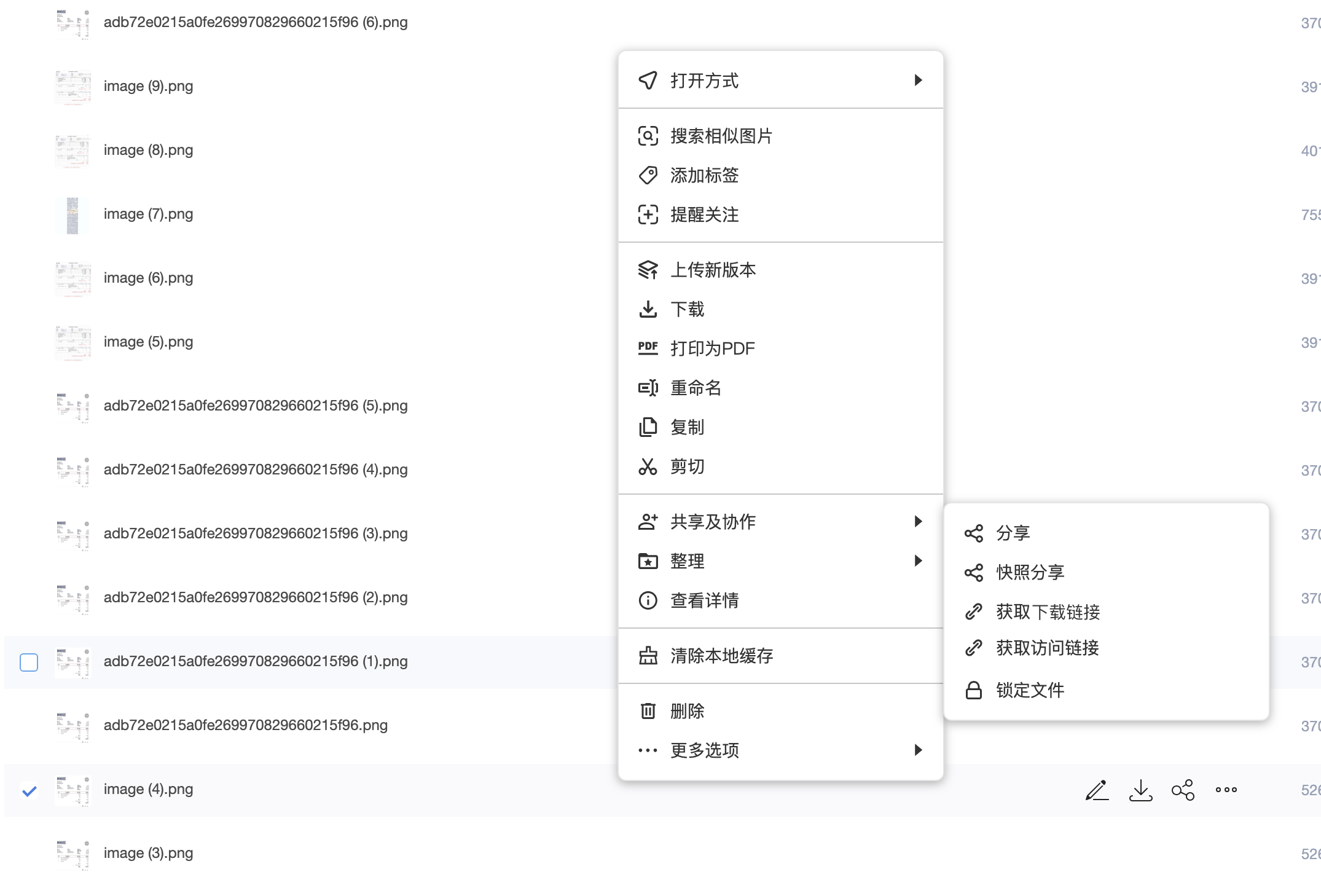
Authorized users can right-click a file in the file list, open Sharing And Collaboration, and choose Get Download Link.
The user must meet all of the following conditions:
- The user has external sharing permission for the file, usually corresponding to anonymous sharing.
- The user has download permission for the file.
- Enterprise or department policies do not prohibit external sharing or download for this file.
If the user only has view permission, preview-only permission, or the file is restricted by security policy, a direct download link should not be generated.
Link Configuration
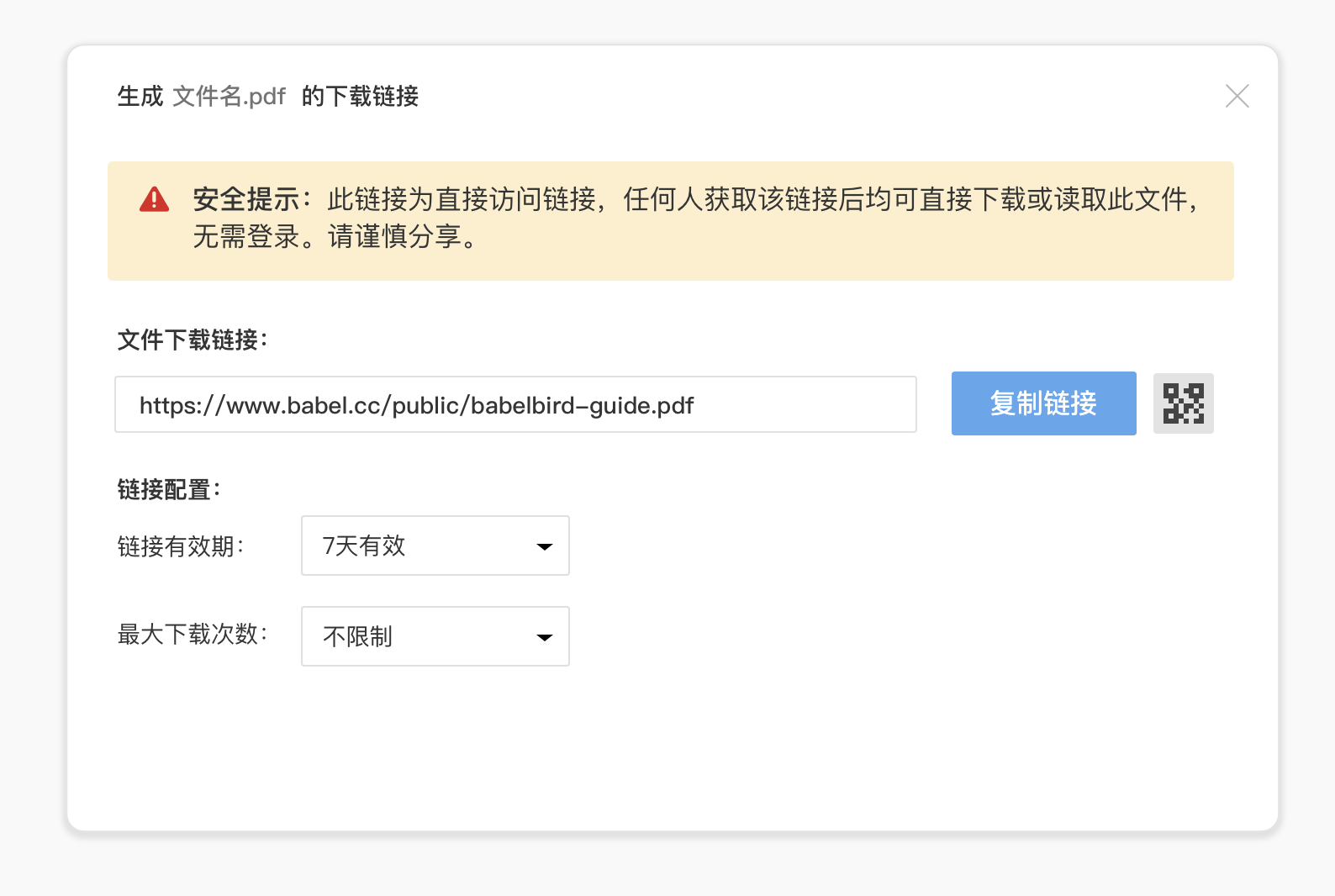
The dialog explicitly warns that this is a direct access link. Anyone who obtains it can download or read the file without logging in. Users should generate this type of link only when necessary and control where it is shared.
| Setting | Options | Notes |
|---|---|---|
| Link expiry | 7 days, 30 days, custom | 7 days is the default. Use shorter validity for temporary delivery and sensitive files |
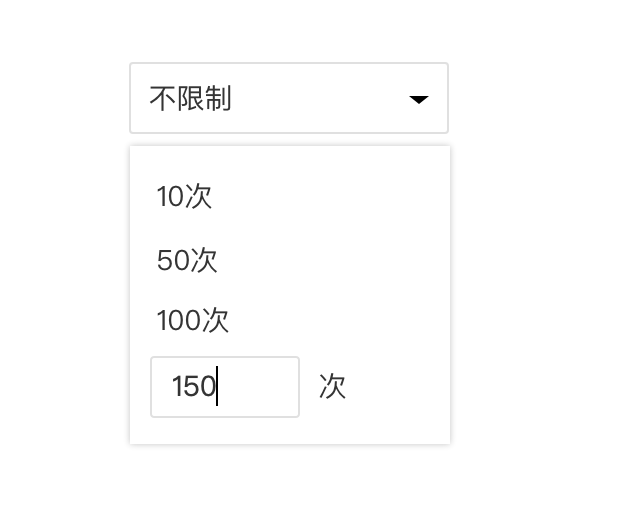
| Maximum downloads | Unlimited, 10, 50, 100, custom | Unlimited is the default. Use limits for customer delivery, temporary downloads or sensitive materials |
| Copy link | Copy the current direct file URL | Paste it into email, chat, tickets, Markdown or AI conversations |
| QR code | Generate a scannable QR code | Useful for mobile download, on-site material pickup and offline delivery |
Usage Scenarios
AI File Reading
When an AI tool needs to read a PDF, image, text file, Markdown file or another publicly reachable file, a normal share link may include a login page, share page or frontend interaction that the AI cannot reliably parse. Generate Download Link provides a direct file URL that is easier for AI tools to read, summarize or reference.
Before using it with external AI services, confirm that the file is suitable for external access. Avoid exposing customer privacy, trade secrets, contracts, certificates, R&D data or internal materials to third-party models.
Markdown And Web Images
When writing Markdown, blogs, documentation or web pages, images need URLs that can be read directly. Generate Download Link can turn an image stored in BabelBird into an embeddable image URL, avoiding the need to download and upload the image to a separate image-hosting service.
Example:
Customer Direct Download
For cases where the recipient only needs to download one file and does not need collaboration or login, a download link can be sent directly to a customer or partner. It is simpler than invitation sharing and more direct than a normal share page.
Typical files include public materials, product manuals, marketing images, standard templates, temporary delivery files and deliverables approved for external sharing.
Third-Party System Reading
Business systems, websites, ticketing systems or automation scripts may need to read a single file URL. Generate Download Link can be used as that file URL for low-frequency, explicit and controlled access. For batch management, permission checks, callbacks or long-term integration, use the API instead.
Security Guidance
- A generated download link bypasses login for file reading, so use it only for materials approved for anonymous access.
- Set shorter expiry and download-count limits for sensitive or temporary files.
- Do not use generated download links as an internal permission-management mechanism. For internal collaboration, use access links, invitation sharing or project permissions.
- For image hosting and AI access, prefer public, low-sensitivity or desensitized files.
- Administrators should manage this capability together with sharing permission, download permission, watermarking, file access control, sensitive content recognition and audit logs.