
File Collection Inbox
A collection inbox gathers submissions into a target folder, such as application documents, supplier credentials, project deliverables and internal reports. It collects files rather than survey answers; see Create a Survey for questionnaires.
Choose a Collection Type
| Type | Intended participants | Submission and visibility |
|---|---|---|
| Internal collection | Selected people within the organization | Participants sign in and see their own submissions and material supplied by the collector, not other participants' submissions |
| Open collection | External customers, suppliers or other contributors | Participants open a link or QR code, enter requested details and upload without first registering a BabelBird account |
Scroll horizontally to view all columns
The collector can inspect received files. Internal participants can maintain their own submissions, including new versions, before the deadline, subject to collection settings and permissions.
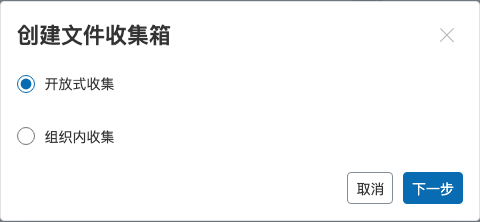
Create an Internal Collection
- Open the target folder, choose Inbox from New, then choose internal collection. You can also start from the File Collection area.
- Enter a recognizable name, confirm the destination, select participants and configure the available deadline and instructions.
- After creation, check the task and notification so participants can sign in and submit.
- Inspect submissions in the task or destination folder. When requesting missing material, identify the required files and deadline.
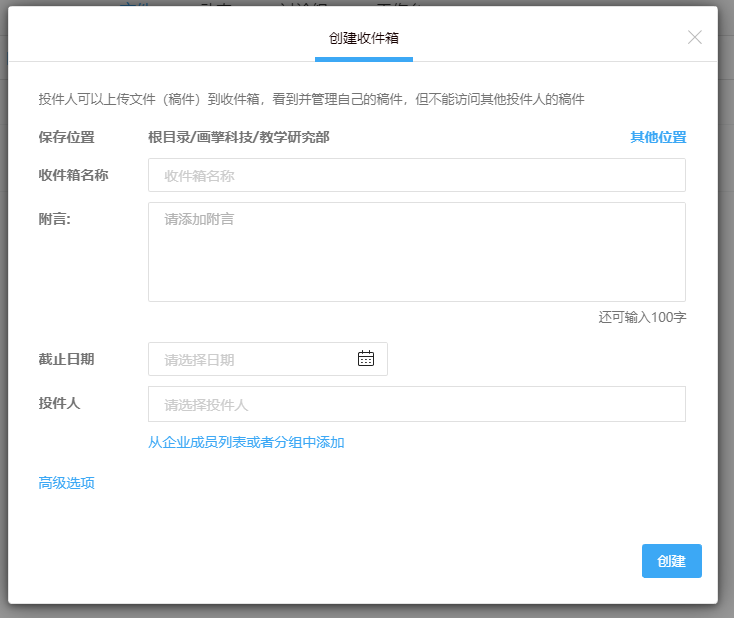
Publish an Open Collection
- Choose open collection, enter a name and check the destination, instructions, deadline and requested submitter information.
- Obtain the collection link or QR code and distribute it to the intended contributors.
- Check the submission entry in a separate browser session. Verify that instructions are clear, submission works and others' material is not exposed. The collector's management view is not a substitute for this check.
- Contributors open the link, enter requested information and upload. Check received files in the task or target folder; distributing the link does not mean collection is complete.
Security restriction: enterprises with confidential departments cannot create open collection inboxes or allow anonymous uploads through link sharing. Ask an administrator to check department security policy and file classification if an entry is unavailable. Public links must not be used to bypass these restrictions.
Before and After Submission
- Confirm appropriate destination permissions and available storage before starting.
- Contributors should check names, versions and upload results before closing the page.
- Collectors should check task validity, contributor details and file content. Inspect available collection settings when a task needs adjustment.
- A collection entry does not share the entire destination folder with contributors. Do not enable general folder downloads as a substitute for collection.
FAQ
Must external contributors join the enterprise?
Not for an open collection. They can enter requested information and upload without joining or registering, provided enterprise policy allows it and the entry is still valid.
Should I use a collection inbox or a survey?
Use an inbox for contracts, images, evidence and deliverables. Use Create a Survey for satisfaction scores, opinions or structured answers. Their permissions, deadlines and data-management rules are not interchangeable.